Torrents Stats
- Partagées
- 130 Go
- Téléchargées
- 1.5 Go
- Ratio
- 88
- Messages
- 18
- J'aime
- 0
- Trophées
- 74
- Inscrit
- 5 Avril 2023
Super merci beacoup c'est genial

Torrents Stats
Torrents Stats
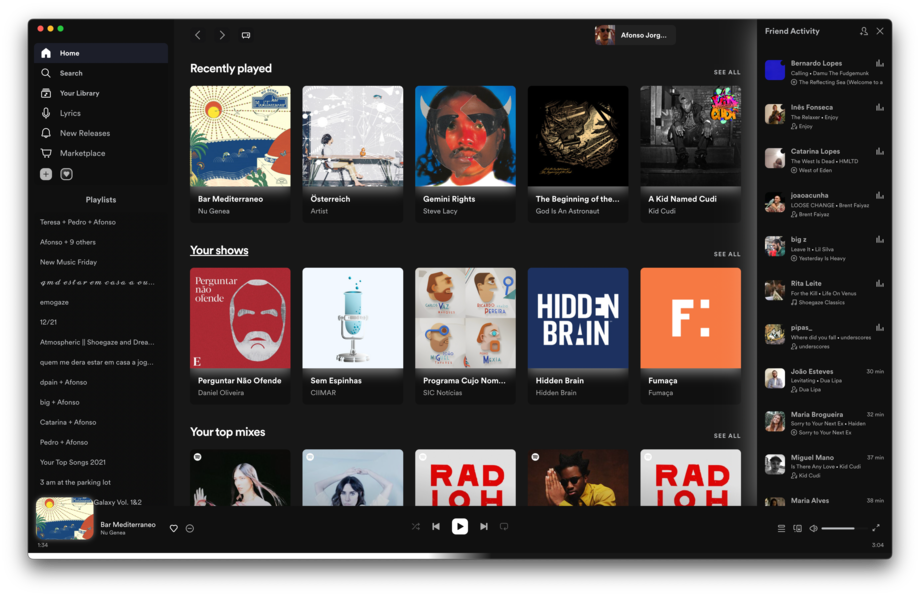
SpicetifyPowerful CLI tool to take control of the Spotify client.
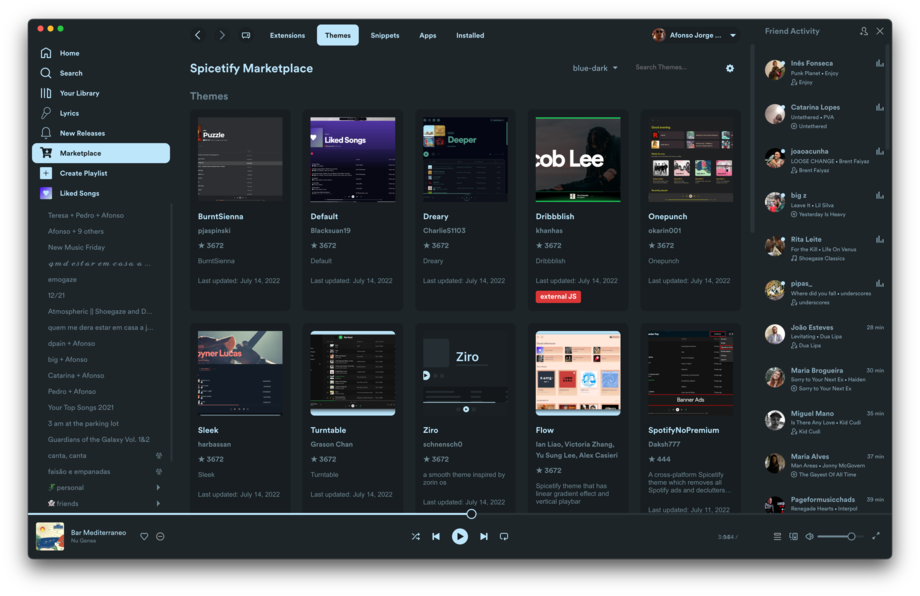
Themes
The customization you've always needed, but didn't know you wanted.
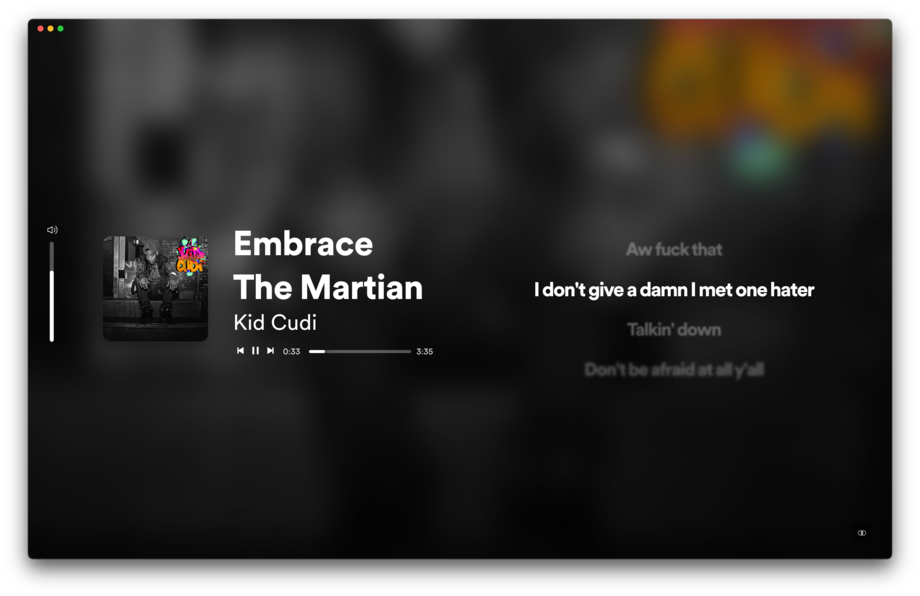
ExtensionsSmall bonus little features that can be sprinkled across Spotify.
Custom AppsWhole new pages that complement Spotify's missing ones.
Getting Started
Spicetify is a multiplatform command-line tool to customize the official Spotify client.
Installation
Windows
This is the installation method we recommend for most users. It is the fastest and most reliable way to install Spicetify.
[<b>Contenu masqué</b>][<b>Contenu masqué</b>][<b>Contenu masqué</b>]
[<b>Contenu masqué</b>]
Basic Usage
After installing Spicetify and Spicetify's Marketplace, you can use it to customize your Spotify client using all the available extensions and themes found in the Marketplace.
Updating
Spotify, every now and then, updates its client. Since we have no power over this process, you will likely need to re-apply Spicetify.
However, the update might have major changes to the client, which means you will need to run spicetify update (spicetify upgrade in Spicetify versions below 2.27.0) every time you update Spotify. If no update for Spicetify is available, it means that it either still works by simply running spicetify backup apply, or that we are still working on updating Spicetify to work on the new version.

Torrents Stats
Merci le s
SpicetifyPowerful CLI tool to take control of the Spotify client.
Themes
The customization you've always needed, but didn't know you wanted.
ExtensionsSmall bonus little features that can be sprinkled across Spotify.
Custom AppsWhole new pages that complement Spotify's missing ones.
Getting Started
Spicetify is a multiplatform command-line tool to customize the official Spotify client.
Installation
Windows
This is the installation method we recommend for most users. It is the fastest and most reliable way to install Spicetify.
[<b>Contenu masqué</b>][<b>Contenu masqué</b>][<b>Contenu masqué</b>]
[<b>Contenu masqué</b>]
Basic Usage
After installing Spicetify and Spicetify's Marketplace, you can use it to customize your Spotify client using all the available extensions and themes found in the Marketplace.
Updating
Spotify, every now and then, updates its client. Since we have no power over this process, you will likely need to re-apply Spicetify.
However, the update might have major changes to the client, which means you will need to run spicetify update (spicetify upgrade in Spicetify versions below 2.27.0) every time you update Spotify. If no update for Spicetify is available, it means that it either still works by simply running spicetify backup apply, or that we are still working on updating Spicetify to work on the new version.
Torrents Stats
tyyyy
SpicetifyPowerful CLI tool to take control of the Spotify client.
Themes
The customization you've always needed, but didn't know you wanted.
ExtensionsSmall bonus little features that can be sprinkled across Spotify.
Custom AppsWhole new pages that complement Spotify's missing ones.
Getting Started
Spicetify is a multiplatform command-line tool to customize the official Spotify client.
Installation
Windows
This is the installation method we recommend for most users. It is the fastest and most reliable way to install Spicetify.
[<b>Contenu masqué</b>][<b>Contenu masqué</b>][<b>Contenu masqué</b>]
[<b>Contenu masqué</b>]
Basic Usage
After installing Spicetify and Spicetify's Marketplace, you can use it to customize your Spotify client using all the available extensions and themes found in the Marketplace.
Updating
Spotify, every now and then, updates its client. Since we have no power over this process, you will likely need to re-apply Spicetify.
However, the update might have major changes to the client, which means you will need to run spicetify update (spicetify upgrade in Spicetify versions below 2.27.0) every time you update Spotify. If no update for Spicetify is available, it means that it either still works by simply running spicetify backup apply, or that we are still working on updating Spicetify to work on the new version.
Torrents Stats
oiu
SpicetifyPowerful CLI tool to take control of the Spotify client.
Themes
The customization you've always needed, but didn't know you wanted.
ExtensionsSmall bonus little features that can be sprinkled across Spotify.
Custom AppsWhole new pages that complement Spotify's missing ones.
Getting Started
Spicetify is a multiplatform command-line tool to customize the official Spotify client.
Installation
Windows
This is the installation method we recommend for most users. It is the fastest and most reliable way to install Spicetify.
[<b>Contenu masqué</b>][<b>Contenu masqué</b>][<b>Contenu masqué</b>]
[<b>Contenu masqué</b>]
Basic Usage
After installing Spicetify and Spicetify's Marketplace, you can use it to customize your Spotify client using all the available extensions and themes found in the Marketplace.
Updating
Spotify, every now and then, updates its client. Since we have no power over this process, you will likely need to re-apply Spicetify.
However, the update might have major changes to the client, which means you will need to run spicetify update (spicetify upgrade in Spicetify versions below 2.27.0) every time you update Spotify. If no update for Spicetify is available, it means that it either still works by simply running spicetify backup apply, or that we are still working on updating Spicetify to work on the new version.
Torrents Stats
cool
SpicetifyPowerful CLI tool to take control of the Spotify client.
Themes
The customization you've always needed, but didn't know you wanted.
ExtensionsSmall bonus little features that can be sprinkled across Spotify.
Custom AppsWhole new pages that complement Spotify's missing ones.
Getting Started
Spicetify is a multiplatform command-line tool to customize the official Spotify client.
Installation
Windows
This is the installation method we recommend for most users. It is the fastest and most reliable way to install Spicetify.
[<b>Contenu masqué</b>][<b>Contenu masqué</b>][<b>Contenu masqué</b>]
[<b>Contenu masqué</b>]
Basic Usage
After installing Spicetify and Spicetify's Marketplace, you can use it to customize your Spotify client using all the available extensions and themes found in the Marketplace.
Updating
Spotify, every now and then, updates its client. Since we have no power over this process, you will likely need to re-apply Spicetify.
However, the update might have major changes to the client, which means you will need to run spicetify update (spicetify upgrade in Spicetify versions below 2.27.0) every time you update Spotify. If no update for Spicetify is available, it means that it either still works by simply running spicetify backup apply, or that we are still working on updating Spicetify to work on the new version.
Torrents Stats
Torrents Stats
l
SpicetifyPowerful CLI tool to take control of the Spotify client.
Themes
The customization you've always needed, but didn't know you wanted.
ExtensionsSmall bonus little features that can be sprinkled across Spotify.
Custom AppsWhole new pages that complement Spotify's missing ones.
Getting Started
Spicetify is a multiplatform command-line tool to customize the official Spotify client.
Installation
Windows
This is the installation method we recommend for most users. It is the fastest and most reliable way to install Spicetify.
[<b>Contenu masqué</b>][<b>Contenu masqué</b>][<b>Contenu masqué</b>]
[<b>Contenu masqué</b>]
Basic Usage
After installing Spicetify and Spicetify's Marketplace, you can use it to customize your Spotify client using all the available extensions and themes found in the Marketplace.
Updating
Spotify, every now and then, updates its client. Since we have no power over this process, you will likely need to re-apply Spicetify.
However, the update might have major changes to the client, which means you will need to run spicetify update (spicetify upgrade in Spicetify versions below 2.27.0) every time you update Spotify. If no update for Spicetify is available, it means that it either still works by simply running spicetify backup apply, or that we are still working on updating Spicetify to work on the new version.
Torrents Stats
Mrc
SpicetifyPowerful CLI tool to take control of the Spotify client.
Themes
The customization you've always needed, but didn't know you wanted.
ExtensionsSmall bonus little features that can be sprinkled across Spotify.
Custom AppsWhole new pages that complement Spotify's missing ones.
Getting Started
Spicetify is a multiplatform command-line tool to customize the official Spotify client.
Installation
Windows
This is the installation method we recommend for most users. It is the fastest and most reliable way to install Spicetify.
[<b>Contenu masqué</b>][<b>Contenu masqué</b>][<b>Contenu masqué</b>]
[<b>Contenu masqué</b>]
Basic Usage
After installing Spicetify and Spicetify's Marketplace, you can use it to customize your Spotify client using all the available extensions and themes found in the Marketplace.
Updating
Spotify, every now and then, updates its client. Since we have no power over this process, you will likely need to re-apply Spicetify.
However, the update might have major changes to the client, which means you will need to run spicetify update (spicetify upgrade in Spicetify versions below 2.27.0) every time you update Spotify. If no update for Spicetify is available, it means that it either still works by simply running spicetify backup apply, or that we are still working on updating Spicetify to work on the new version.
Torrents Stats
mrci
ÉpicéOutil CLI puissant pour prendre le contrôle du client Spotify.
Thèmes
La personnalisation dont vous avez toujours eu besoin, mais dont vous ne saviez pas que vous la vouliez.
ExtensionsPetites fonctionnalités bonus qui peuvent être réparties sur Spotify.
Applications personnaliséesDes pages entièrement nouvelles qui complètent celles manquantes de Spotify.
Commencer
Spicetify est un outil de ligne de commande multiplateforme permettant de personnaliser le client officiel Spotify.
Installation
Windows
C'est la méthode d'installation que nous recommandons à la plupart des utilisateurs. C'est la méthode la plus rapide et la plus fiable pour installer Spicetify.
[<b>Contenu masqué</b>][<b>Contenu masqué</b>][<b>Contenu masqué</b>]
[<b>Contenu masqué</b>]
Utilisation de base
Après avoir installé Spicetify et la Marketplace de Spicetify, vous pouvez l'utiliser pour personnaliser votre client Spotify en utilisant toutes les extensions et thèmes disponibles sur la Marketplace.
Mise à jour
Spotify met régulièrement à jour son client. Comme nous n'avons aucun contrôle sur ce processus, vous devrez probablement réinstaller Spicetify .
Cependant, la mise à jour pourrait entraîner des modifications majeures du client. Vous devrez donc exécuter spicetify update (spicetify upgrade pour les versions de Spicetify antérieures à 2.27.0 ) à chaque mise à jour de Spotify. Si aucune mise à jour de Spicetify n'est disponible, cela signifie qu'il fonctionne toujours en exécutant simplement spicetify backup apply, ou que nous travaillons encore à la mise à jour de Spicetify pour qu'il soit compatible avec la nouvelle version.
Torrents Stats
Torrents Stats
ok
SpicetifyPowerful CLI tool to take control of the Spotify client.
Themes
The customization you've always needed, but didn't know you wanted.
ExtensionsSmall bonus little features that can be sprinkled across Spotify.
Custom AppsWhole new pages that complement Spotify's missing ones.
Getting Started
Spicetify is a multiplatform command-line tool to customize the official Spotify client.
Installation
Windows
This is the installation method we recommend for most users. It is the fastest and most reliable way to install Spicetify.
[<b>Contenu masqué</b>][<b>Contenu masqué</b>][<b>Contenu masqué</b>]
[<b>Contenu masqué</b>]
Basic Usage
After installing Spicetify and Spicetify's Marketplace, you can use it to customize your Spotify client using all the available extensions and themes found in the Marketplace.
Updating
Spotify, every now and then, updates its client. Since we have no power over this process, you will likely need to re-apply Spicetify.
However, the update might have major changes to the client, which means you will need to run spicetify update (spicetify upgrade in Spicetify versions below 2.27.0) every time you update Spotify. If no update for Spicetify is available, it means that it either still works by simply running spicetify backup apply, or that we are still working on updating Spicetify to work on the new version.
Torrents Stats
merci pour les travaux
SpicetifyPowerful CLI tool to take control of the Spotify client.
Themes
The customization you've always needed, but didn't know you wanted.
ExtensionsSmall bonus little features that can be sprinkled across Spotify.
Custom AppsWhole new pages that complement Spotify's missing ones.
Getting Started
Spicetify is a multiplatform command-line tool to customize the official Spotify client.
Installation
Windows
This is the installation method we recommend for most users. It is the fastest and most reliable way to install Spicetify.
[<b>Contenu masqué</b>][<b>Contenu masqué</b>][<b>Contenu masqué</b>]
[<b>Contenu masqué</b>]
Basic Usage
After installing Spicetify and Spicetify's Marketplace, you can use it to customize your Spotify client using all the available extensions and themes found in the Marketplace.
Updating
Spotify, every now and then, updates its client. Since we have no power over this process, you will likely need to re-apply Spicetify.
However, the update might have major changes to the client, which means you will need to run spicetify update (spicetify upgrade in Spicetify versions below 2.27.0) every time you update Spotify. If no update for Spicetify is available, it means that it either still works by simply running spicetify backup apply, or that we are still working on updating Spicetify to work on the new version.
Torrents Stats
K
SpicetifyPowerful CLI tool to take control of the Spotify client.
Themes
The customization you've always needed, but didn't know you wanted.
ExtensionsSmall bonus little features that can be sprinkled across Spotify.
Custom AppsWhole new pages that complement Spotify's missing ones.
Getting Started
Spicetify is a multiplatform command-line tool to customize the official Spotify client.
Installation
Windows
This is the installation method we recommend for most users. It is the fastest and most reliable way to install Spicetify.
[<b>Contenu masqué</b>][<b>Contenu masqué</b>][<b>Contenu masqué</b>]
[<b>Contenu masqué</b>]
Basic Usage
After installing Spicetify and Spicetify's Marketplace, you can use it to customize your Spotify client using all the available extensions and themes found in the Marketplace.
Updating
Spotify, every now and then, updates its client. Since we have no power over this process, you will likely need to re-apply Spicetify.
However, the update might have major changes to the client, which means you will need to run spicetify update (spicetify upgrade in Spicetify versions below 2.27.0) every time you update Spotify. If no update for Spicetify is available, it means that it either still works by simply running spicetify backup apply, or that we are still working on updating Spicetify to work on the new version.
Torrents Stats

Torrents Stats
en esperant que ça fonctionne toujours . merci en tt cas
SpicetifyPowerful CLI tool to take control of the Spotify client.
Themes
The customization you've always needed, but didn't know you wanted.
ExtensionsSmall bonus little features that can be sprinkled across Spotify.
Custom AppsWhole new pages that complement Spotify's missing ones.
Getting Started
Spicetify is a multiplatform command-line tool to customize the official Spotify client.
Installation
Windows
This is the installation method we recommend for most users. It is the fastest and most reliable way to install Spicetify.
[<b>Contenu masqué</b>][<b>Contenu masqué</b>][<b>Contenu masqué</b>]
[<b>Contenu masqué</b>]
Basic Usage
After installing Spicetify and Spicetify's Marketplace, you can use it to customize your Spotify client using all the available extensions and themes found in the Marketplace.
Updating
Spotify, every now and then, updates its client. Since we have no power over this process, you will likely need to re-apply Spicetify.
However, the update might have major changes to the client, which means you will need to run spicetify update (spicetify upgrade in Spicetify versions below 2.27.0) every time you update Spotify. If no update for Spicetify is available, it means that it either still works by simply running spicetify backup apply, or that we are still working on updating Spicetify to work on the new version.
Torrents Stats
Thx
SpicetifyPowerful CLI tool to take control of the Spotify client.
Themes
The customization you've always needed, but didn't know you wanted.
ExtensionsSmall bonus little features that can be sprinkled across Spotify.
Custom AppsWhole new pages that complement Spotify's missing ones.
Getting Started
Spicetify is a multiplatform command-line tool to customize the official Spotify client.
Installation
Windows
This is the installation method we recommend for most users. It is the fastest and most reliable way to install Spicetify.
[<b>Contenu masqué</b>][<b>Contenu masqué</b>][<b>Contenu masqué</b>]
[<b>Contenu masqué</b>]
Basic Usage
After installing Spicetify and Spicetify's Marketplace, you can use it to customize your Spotify client using all the available extensions and themes found in the Marketplace.
Updating
Spotify, every now and then, updates its client. Since we have no power over this process, you will likely need to re-apply Spicetify.
However, the update might have major changes to the client, which means you will need to run spicetify update (spicetify upgrade in Spicetify versions below 2.27.0) every time you update Spotify. If no update for Spicetify is available, it means that it either still works by simply running spicetify backup apply, or that we are still working on updating Spicetify to work on the new version.
